Efficient
NewSession-aware routing for smarter spend.
Routes using live session classification.
See benchmark vs Opus 4.8Auto Model routes each request to the model that best fits the work, so you spend less. Optimize your workflow with smart model orchestration.
Kilo gives you access to 500+ hosted, BYOK, and local models. Auto Model turns that choice into smart orchestration: optimize cost and workflow by letting Kilo route each session to the right model while you stay focused.
500+ hosted models, BYOK, and local models are still available — Auto Model is the default, not a lock-in.
Auto Efficient delivers 71% of published frontier completion at 72% lower cost on KiloBench. See how it compares with Claude Opus 4.8, Claude Sonnet 4.6, and GPT-5.5 on completion rates, cost per attempt, and one-shot app demos.
Auto Model combines session-aware classification with benchmark-proven model selection, so every request lands on the right model for the work.
Efficient, Frontier, or Free defines the capability and cost envelope. Each tier uses a different routing strategy.
A classifier model receives your session data and assigns it a session type from a deterministic list.
Based on the type of work classified and benchmarks Kilo runs, Auto Model picks the best model for your session.
Use Auto Model by default, or manually select hosted, BYOK, or local models when you prefer.
Four tiers cover every tradeoff — from session-aware benchmark routing to maximum capability, cost-effective paid routing, or no-cost free-model routing.
Session-aware routing for smarter spend.
Routes using live session classification.
See benchmark vs Opus 4.8Maximum capability when the work needs it.
Routes to the latest and most capable paid models.
Free and experimental models providers can offer at no cost.
Routes to the best free models available.
Admins decide which providers and models are allowed to route to. Developers get smart routing by default, inside the boundaries you approved.
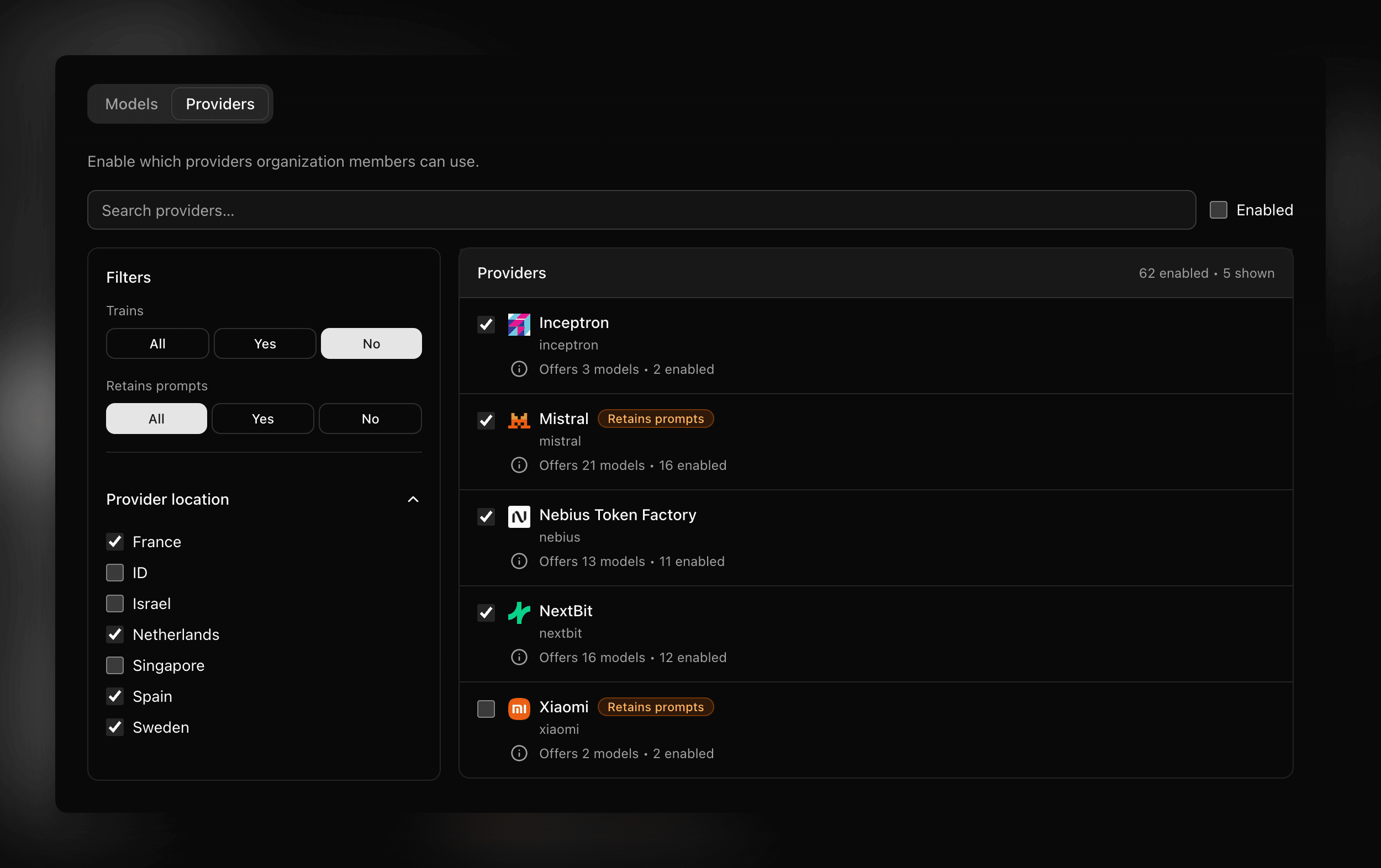
Enable only approved models & providers, filtered by whether they train on data, retain prompts, run in a given country, or other organizational policy.
Model-level toggles decide which models enter the routing pool, so Auto Model can never select outside your policy.
Organizations create sub-organizations, distribute funds, and inspect usage per sub-organization or across the whole enterprise.
Per-user daily budgets, shared balances, and usage analytics & insights to maintain cost control on top of smart routing.
Kilo Gateway supplies the 500+ hosted-model catalog and routing infrastructure behind Auto Model tiers.
Learn moreKilo Pass gives you extra free inference every month, so Auto Model has more room to route work across the models that fit each session.
Learn moreSee which models developers actually use across coding, planning, debugging, and agent workflows.
Learn moreBrowse officially promoted benchmark results for AI coding models on Terminal Bench 2.0.
Learn moreModel control
Auto Model does not remove choice. It gives you a smarter default while keeping manual model selection, BYOK, local models, and tier selection available whenever you want them.
Choose Efficient, Frontier, or Free based on your cost and capability goals.
Auto Model classifies each session and routes to the optimal model for the work — no manual switching required.
Pick a specific model, use BYOK keys, or run local models with Ollama or LM Studio whenever you prefer.
Kilo Pass adds free inference every month, giving Auto Model more room to route across the right models.
Everything you need to know about Auto Model
Auto Model is Kilo's automatic model routing system. You choose a tier, and Kilo routes each request to a model strategy that fits the work instead of making you switch models manually.
Auto Model helps control cost through smart model orchestration. It routes each session toward models that fit the work, so routine tasks do not need frontier-level spend and harder work can still use stronger models when your tier supports it.
Efficient uses live session classification for session-aware routing, routing all modes to a cost-effective paid model for capable results without frontier prices. Frontier routes to the latest and most capable paid models. Free routes to the best free models available, including free and experimental models providers can offer at no cost.
Yes. Auto Model is a default routing option, not a lock-in. You can still pick a specific hosted model, use BYOK provider keys, or run local models with Ollama or LM Studio.
Yes. Kilo Gateway provides the 500+ hosted-model catalog and routing infrastructure behind Auto Model tiers.
Yes. Kilo Pass gives you extra free inference every month, so Auto Model has more room to route work across the models that fit each session.
The Kilo Leaderboard shows real-world model usage across developer workflows, while KiloBench measures coding performance on benchmarked tasks. Together, they give visibility into the model signals behind smarter routing decisions.
In most cases, yes — model choice is not just a nice-to-have anymore. We benchmarked Auto Model against manually picking a model and found Auto Model matches or beats manual selection on completion rate while cutting cost.
Read the Auto Model vs. picking your own model benchmarkStart with Kilo Code and use Auto Model when you want model freedom without the manual switching overhead.